Motion · Typography
Paper title card
A sentence letterpress-stamps onto paper word by word, one word marked in italic accent color, closed off by a short dash.
Source: video-shotcraft (Vincent Wei) ↗ · Apache-2.0 · Remotion composition (React/TSX) — preview video, no in-browser player
When to use
A chapter transition / value-prop title card; a lead-in card before an important feature appears; a breathing beat for the whole film
Intention
Give the viewer a sentence's worth of breathing room between two product sequences: state clearly "what's next, and why it matters." The letterpress-stamp texture puts the title card in the same world as paper-and-ink-styled product visuals.
Duration & energy
- Duration: 1.7–1.8s (50–55f)
- Energy: Low (a breathing beat separating two high-energy shots)
Shot recipe (original Chinese — timing, easing, parameter table, known pitfalls)
意图
在两段产品画面之间给观众一句话的喘息:说清"接下来看什么、它值什么"。letterpress 压印质感让字卡与纸墨风格的产品画面同属一个世界。
动效核心
- 单句文案逐词入场:scale 从大压到 1 + blur→0 + opacity(letterpress 压印配方)
- 每句恰好一个重点词:italic + 强调色(模板片为琥珀)
- 强调色短下划线 scaleX 0→1 收束
- 尾部整卡淡出交棒;可挂 mono 小字副行 + DigitRoll 数字
参数表
| 参数 | 典型值 | 调节手感 | |------|--------|----------| | 逐词入场 | 第 i 词 delay = 4 + i·4、9f,bezier(0.2,0.75,0.3,1);scale 1.28→1 + blur 7px→0 + opacity | scale 起点 1.28 是"压印"读感的甜点——对照暗场版 TitleCard 用 40px 上移+blur 10,同配方明暗两版 | | 重点词 | italic + 强调色 oklch(52% 0.115 65),一句恰好一个 accent | 两个 accent 等于没有 accent;重点词选功能名/收益词(C2) | | 下划线 | 16→34f scaleX 0→1,220×6px 强调色 | 下划线是收束信号,出现即预告本卡快结束 | | 时长 | 全片 4 张字卡均 50–55f(≈1.8s) | 字卡时长定式化——观众读一句话的时间,长了拖节奏短了读不完 | | 版式 | 字号 116/serif;纸底 oklch(97.5% 0.008 82) + 中心暖光 radial;尾部 8f 淡出 | 纸底+暖光与产品画面同色系,字卡才不像广告插播 | | 副行 | mono 小字 + DigitRoll(如 "5 of 31 fetched today");digit-roll 参数见 list-stack-press 卡计数器行 | 副行给具体数字最有说服力;数字滚动必须在本卡淡出前落定(教训)——排节拍从本卡淡出帧倒推 |
声音
字卡出场统一钉 swoosh-quick(模板片四张字卡钉在 f220/565/725/885 同音)——同类元素同音是词汇表纪律(S2);字卡本身无落地重音,能量留给前后镜头。
已知坑
- 文案要具体:带产品功能名+具体收益,抽象隐喻词被用户逐字改掉(C2——"one board"→"one place to go"、加 "Paper Radar");文案在画面锁定后按最终镜头重写一遍(C1)
- 重要功能出场前要有引导字卡(C2 判例:文档镜头前应加一句引导,如 "Every project, linked to your weekly report")——字卡不是装饰,是章节路标
参考实现
demos/typography/paper-title-card/PaperTitleCard.tsx(原 template/src/aifl/PaperTitleCard.tsx,参数化:words/sub/subDigits 可换文案)
Reference implementation (Remotion)
- demos/typography/paper-title-card/PaperTitleCard.tsx — https://raw.githubusercontent.com/Vincentwei1021/video-shotcraft/main/demos/typography/paper-title-card/PaperTitleCard.tsx
The component imports shared fixtures from demos/_fixtures and helpers from assets/lib in the repo; SKILL.md there documents the render workflow.
Everything on this page is also machine-readable. Point your agent at the JSON, or add the gimgs MCP server and ask it to search motion templates.
- Fetch the JSON — it holds the shot recipe (timing, easing, parameter table, pitfalls) and the full TSX source.
- Clone the video-shotcraft repo; the component imports shared fixtures from demos/_fixtures and helpers from assets/lib.
- Register the component as a <Composition> in a Remotion project and render with `npx remotion render`, or re-implement the recipe in your own engine.
curl -s https://gimgs.net/motion/paper-title-card.jsongit clone https://github.com/Vincentwei1021/video-shotcraft
# component: demos/typography/paper-title-card/PaperTitleCard.tsx
npx remotion render <CompositionId> out.mp4claude mcp add --transport http gimgs https://gimgs.net/mcp
# then: search_motion_templates / get_motion_template("paper-title-card")Prompt
Use the video-shotcraft shot recipe "Paper title card" (Remotion composition, Apache-2.0) published on gimgs.net.
Recipe JSON (prompt = timing/easing/parameter table/pitfalls, files = TSX source): https://gimgs.net/motion/paper-title-card.json
Raw TSX: https://gimgs.net/motion/paper-title-card/template.html
Repository: https://github.com/Vincentwei1021/video-shotcraft  (component: demos/typography/paper-title-card/PaperTitleCard.tsx; imports demos/_fixtures and assets/lib)
Spec: 960x540, 30 fps, 1.83s

1. Read the JSON and follow its "prompt" section (when to use, intention, parameter table, known pitfalls).
2. Adapt it for: <describe what you want>.
3. Either clone the repo, register the component as a <Composition> in a Remotion project and run npx remotion render <CompositionId> out.mp4 — or re-implement the recipe in your own engine (HTML/WAAPI works: keep the same timing and easing).
// ===== demos/typography/paper-title-card/PaperTitleCard.tsx =====
// paper-title-card —— 一句话逐词 letterpress 压印上纸字卡
// 章节转场/价值主张呼吸位:单句文案逐词压印入场(scale 大→1 + blur→0),
// 每句恰一个强调色斜体重点词,强调色下划线 scaleX 收束,尾部整卡淡出。
// 全片多张字卡统一 50–55f;纸底+中心暖光与纸墨风格产品画面同色系。
// 参数化:words/sub/subDigits 可换成目标产品文案;subDigits 走 DigitRoll
// 数字滚动(必须在本卡淡出前落定)。渲染本 demo 前把 text 复制进项目即可。
import React from 'react';
import { AbsoluteFill, interpolate, useCurrentFrame, Easing } from 'remotion';

export const PAPER_TITLE_CARD_DURATION = 55; // ≈1.8s @30fps

const SERIF = 'ui-serif, Georgia, "Times New Roman", serif';
const MONO = 'ui-monospace, SFMono-Regular, Menlo, monospace';

// 每句恰好一个 accent:功能名/收益词(C2)
const WORDS: { text: string; accent?: boolean }[] = [
  { text: 'All' },
  { text: 'your' },
  { text: 'team’s' },
  { text: 'research,' },
  { text: 'one', accent: true },
  { text: 'place' },
  { text: 'to' },
  { text: 'go.' },
];
const SUB = 'of 31 fetched today';
const SUB_DIGITS = '5';

// 数字滚动列(odometer 风格,复制自 template DigitRoll,数字带双份拼接保证
// 任何目标位都有滚感;tabular-nums 防横向抖)
const DIGITS = '0123456789';
const DigitColumn: React.FC<{ ch: string; delay: number; lineH: number; color: string }> = ({ ch, delay, lineH, color }) => {
  const frame = useCurrentFrame();
  if (ch < '0' || ch > '9') {
    return <span style={{ fontSize: 26, lineHeight: `${lineH}px`, color }}>{ch}</span>;
  }
  const target = DIGITS.indexOf(ch);
  const t = interpolate(frame, [delay, delay + 22], [0, 1], {
    extrapolateLeft: 'clamp',
    extrapolateRight: 'clamp',
    easing: Easing.bezier(0.25, 0.8, 0.25, 1),
  });
  const offset = (10 + target) * t * lineH;
  return (
    <span style={{ display: 'inline-block', height: lineH }}>
      <span style={{ display: 'block', transform: `translateY(${-offset}px)` }}>
        {(DIGITS + DIGITS).split('').map((d, j) => (
          <span
            key={j}
            style={{
              display: 'block',
              fontSize: 26,
              lineHeight: `${lineH}px`,
              color,
              fontVariantNumeric: 'tabular-nums',
            }}
          >
            {d}
          </span>
        ))}
      </span>
    </span>
  );
};

const DigitRoll: React.FC<{ value: string; delay: number; color: string }> = ({ value, delay, color }) => {
  const lineH = 26 * 1.15;
  return (
    <span style={{ display: 'inline-flex', overflow: 'hidden', height: lineH, verticalAlign: 'bottom' }}>
      {value.split('').map((c, i) => (
        <DigitColumn key={i} ch={c} delay={delay + i * 4} lineH={lineH} color={color} />
      ))}
    </span>
  );
};

export const PaperTitleCard: React.FC = () => {
  const frame = useCurrentFrame();
  const duration = PAPER_TITLE_CARD_DURATION;
  const fadeOut = interpolate(frame, [duration - 8, duration], [1, 0], {
    extrapolateLeft: 'clamp',
    extrapolateRight: 'clamp',
  });
  const underline = interpolate(frame, [16, 34], [0, 1], {
    extrapolateLeft: 'clamp',
    extrapolateRight: 'clamp',
    easing: Easing.bezier(0.3, 0, 0.2, 1),
  });
  const subT = interpolate(frame, [10, 22], [0, 1], {
    extrapolateLeft: 'clamp',
    extrapolateRight: 'clamp',
  });

  return (
    <AbsoluteFill
      style={{
        backgroundColor: 'oklch(97.5% 0.008 82)',
        justifyContent: 'center',
        alignItems: 'center',
        opacity: fadeOut,
        backgroundImage:
          'radial-gradient(1100px 750px at 50% 42%, oklch(99.3% 0.014 88 / 0.85), transparent 65%)',
      }}
    >
      <div style={{ textAlign: 'center', maxWidth: 1500 }}>
        <div
          style={{
            fontFamily: SERIF,
            fontSize: 116,
            fontWeight: 600,
            lineHeight: 1.14,
            color: 'oklch(18% 0.006 82)',
            letterSpacing: '-0.012em',
            display: 'flex',
            flexWrap: 'wrap',
            justifyContent: 'center',
            columnGap: '0.26em',
          }}
        >
          {WORDS.map((w, i) => {
            const delay = 4 + i * 4;
            const t = interpolate(frame, [delay, delay + 9], [0, 1], {
              extrapolateLeft: 'clamp',
              extrapolateRight: 'clamp',
              easing: Easing.bezier(0.2, 0.75, 0.3, 1),
            });
            return (
              <span
                key={i}
                style={{
                  opacity: t,
                  transform: `scale(${1.28 - 0.28 * t})`,
                  filter: `blur(${(1 - t) * 7}px)`,
                  display: 'inline-block',
                  fontStyle: w.accent ? 'italic' : 'normal',
                  color: w.accent ? 'oklch(52% 0.115 65)' : undefined,
                }}
              >
                {w.text}
              </span>
            );
          })}
        </div>
        <div
          style={{
            height: 6,
            width: 220,
            margin: '38px auto 0',
            borderRadius: 3,
            background: 'oklch(52% 0.115 65)',
            transform: `scaleX(${underline})`,
          }}
        />
        <div
          style={{
            fontFamily: MONO,
            fontSize: 26,
            letterSpacing: '0.12em',
            color: 'oklch(50% 0.006 82)',
            marginTop: 34,
            opacity: subT,
            textTransform: 'uppercase',
            display: 'flex',
            justifyContent: 'center',
            alignItems: 'baseline',
            gap: '0.5em',
          }}
        >
          <DigitRoll value={SUB_DIGITS} delay={12} color="oklch(52% 0.115 65)" />
          <span>{SUB}</span>
        </div>
      </div>
    </AbsoluteFill>
  );
};
- Read the recipePrompt = when to use, intention, parameter table with typical values and how each one feels, known pitfalls. Treat values as calibrated starting points.
- Get the codetool: git
git clone https://github.com/Vincentwei1021/video-shotcraft && cd video-shotcraft && npm install - Register + rendertool: remotion
npx remotion render <CompositionId> out.mp4 # component: demos/typography/paper-title-card/PaperTitleCard.tsx - Or re-implementPort the timing/easing from the recipe to HTML + WAAPI (gimgs motion contract) or any engine; keep the same segment windows and easing.
| param | type | default | description |
|---|---|---|---|
| — | |||
More in this category

Word relay geometry
Three benefit words each carry their own dedicated geometry relay — a dashed circle spins and shrinks → three solid circles trim-grow in sequence → a metallic sheen sweeps then collapses to pure white; each new word outlines then fills in.
Word relay filmstrip
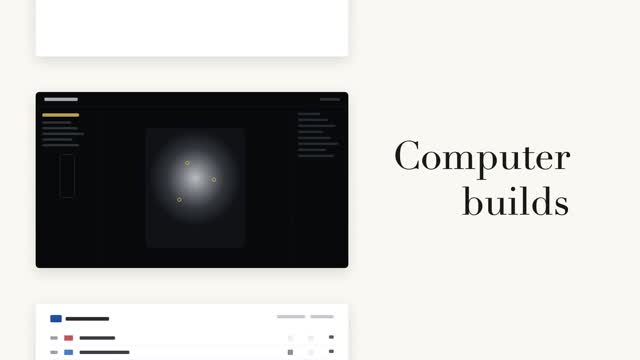
A left column of black-and-white page cards steps forward while a serif big word on the right relays in place (a fixed noun + a cycling verb) — the column steps only when the word changes, aligned to the current page card's midpoint.

Vertical word-roll cycle
The sentence's last word cycles on a vertical roller, 3 swaps at 0.55s each, fast then very slow with a slight overshoot; neighboring rows carry vertical blur and grayscale by distance, the centered word snapping from gray to accent color as it lands.

Two code reveals, side by side
The same syntax-highlighted code reveals two ways side by side — left: line-level stagger fading up 8px, right: character-by-character typing keeping each token's original color, with a #3a4468 block cursor on the current character.